
Honestly speaking, home security is not something to be concerned about when incidents like burglary or home accidents occur near you. But it is one of the important things to be cared for.
But the reality is your home protection has become an important consideration nowadays. As we know, the traditional old security systems are working well now. But their buying cost is high as well, and they need professional installations and subscriptions, which makes the total cost huge. It may not be possible to afford it for all. Here comes the necessity of a DIY home security system.
Why is DIY necessary?
DIY gives you more control; you can choose the components and devices required. You can assemble and install them completely by yourself. No need to go for long subscription contracts, no worries about renewals. The modern home security systems provide lots of features like connecting with the internet and smartphones, making it easy to monitor your home from remote places.
This guide lets you walk through almost all the necessary things you need to know before starting your DIY work at home. It covers clearly understanding your needs and how to get the required devices and how to install and maintain the system properly.
No matter who you are, you may be the house owner, renter, or a person trying to secure property on a budget; this guide will help you to make the right decisions.
Understanding Your Home Security Needs
Before starting to purchase, consider giving some time to analyze your real requirements.
Nature of property
Keep in mind, security for individual houses, villas, bungalows, and apartments is not the same.
Ask yourself the following queries:
• The size of your home?
• How many doors and windows are accessible from outside? – Very important to locate entry cameras or sensors.
• Do you have a vehicle garage, balconies, or a backyard? – If yes, then need to extend the security plan.
• Is your neighborhood generally quiet, or has there been criminal activity happening recently? – Need to check the information and records from newspapers or the neighborhood. This information is valuable in the design process.
Usually, a large villa with multiple entry points (doors & windows) will require more sensors and cameras to be installed. On the other hand, small apartments require only a few well-placed security devices.
Always remember, security is not about how much you spend on installation, but it is about how smart you have spent it.
Give priority to the requirement
Different homes have different types of needs. The common requirements are as follows :
• Intrusion detection (door/window sensors and motion detectors)
• Fire and carbon monoxide protection
• Video surveillance for indoor or outdoor areas
• Smart home integration with locks and lights
For example, if you are a frequent traveler, remote monitoring is important for you. If you are living alone and work near your residence, then normal SMS alert would be sufficient.
Plan Your Budget Carefully
DIY system kits are generally available at affordable prices compared to the professional or branded systems. The cost may vary depending on your requirements.
Decide and finalize a clear budget before making a purchase. Consider price and features, but never compromise good features for price. Paying a little more up front may save money in the future.
Monitoring plans are another important factor to be considered. Some models offer self-monitoring without a monthly fee, while others provide 24/7 professional monitoring for an additional cost.
Please avoid buying a basic kit without checking the number of sensors inside. Make sure the number of sensors present matches your requirement.
Core Components of a DIY Home Security System
Let’s break down the essential parts of the DIY system.
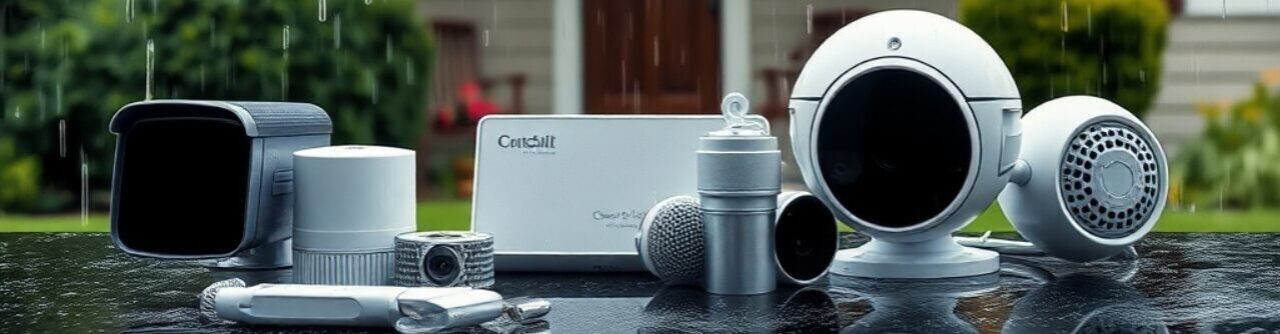
Control Panel or Hub
The control unit is the central part of the system. It can be considered the brain of the system. It connects all sensors, cameras, and alarms.
Consider the following:
• Battery backup
• Cellular backup
• Mobile app support
The battery backup is very important because it ensures your system is always active, even during power failures.
Entry Sensors
These are small devices usually placed on doors and windows to get alert messages when somebody opens.
Mainly, they are available in two types
• Magnetic contact sensors
• Glass-break sensors
First, install them on the main doors and other entry points, then cover other parts on requirement.
Don’t ignore side windows or garage doors because of their rare usage. Give them importance.
Motion Detectors
Motion detectors are sensors used to detect any movement inside or outside your home. They are good in hallways, staircases, and Living rooms.
The latest models offer the following:
• Adjustable sensitivity
• Pet-friendly modes
For the installation of these sensors, you need to choose the right place. Avoid placing them in direct sunlight, as this may affect the performance of the device.
Security Cameras
The security cameras always provide visual evidence and real-time monitoring on the premises.
Choose the best suited:
• Indoor cameras
• Outdoor weatherproof cameras
• Wired or wireless options
Consider the following features:
• Night vision
• wo-way audio
• Motion-triggered recording
• Cloud or local storage
Balance the position of camera placement, especially outdoors; do not keep it too high or too low. Place them properly where the visuals are clear.
Sirens and Alarms
The instant loud alarm scared the intruder. It also alerts the neighbor about the intrusion.
Some systems come with built-in sirens, while others provide provisions to add separate indoor or outdoor units.
The purpose of keeping a siren is only to draw attention by making a huge noise.
Monitoring Options
Monitoring options are mainly of two types
Self-monitoring:
In this system, you will get alerts by SMS to your phone. You have to decide by yourself about the action to be taken.
Professional monitoring:
In this system, the alert goes to the “Central Monitoring Center,” and they will take the required action to protect the property. But there will be a monthly fee for this installation.
If you are a frequent traveler and unable to respond to the notifications, then the better choice is to go for a professional installation.
Security Cameras
Popular DIY Home Security Systems
Here are some widely recognized options in the market:
SimpliSafe
This company is known for simple setup and no long-term contracts. It offers entry sensors, cameras, and optional professional monitoring. It is reliable and beginner-friendly
Ring Alarm
Popular for its ease of use and integration with Alexa-enabled devices. It’s affordable and scalable, but cloud storage usually requires a subscription.
Abode Security
Offers flexible monitoring options and strong smart home compatibility. It’s ideal if you want automation features, though upfront costs may be higher.
Note: Prices change over time. Always check official websites for updated information before making any purchase.
DIY Home security systems in India
Though there are many DIY home security systems from India. Here we only discuss a few from Amazon.
DIY Home Security WiFi Alarm Home
Brand: Towade
The TOWODE DIY Home Security WiFi Alarm System is a practical and beginner-friendly solution for homeowners who want smart protection without complex installation. Powered by AC and designed in a sleek black and red finish, this system includes motion sensor support and remote access through your smartphone, tablet, or PC. It also works seamlessly with wireless detectors, remote controls, and KERUI alarm hubs. Ideal for small homes or apartments, this DIY home security system offers convenient monitoring and reliable alerts at an affordable level.
Automatic Doorbell Project Kit
Brand : RoboArmy DIY
The RoboArmy DIY Automatic Doorbell Project Kit is a fun and educational STEM project designed for kids aged 12 and above. This hands-on robotics kit uses an IR sensor and sound module to detect motion and play a recorded voice alert. It includes all essential components and requires no soldering, making it safe and beginner-friendly. With free live classes, PDF code, and video tutorials, students from classes 7–10 can easily build and understand basic automation concepts while enjoying practical learning.
Lorem ipsum dolor sit amet, consectetur adipiscing elit. Ut elit tellus, luctus nec ullamcorper mattis, pulvinar dapibus leo.
Installation Tips for Better Results
Installing a DIY system is an easy task, but proper planning is needed.
First, make a clear idea about device placement. Map out the house and decide where to install the devices. The weak Wi-Fi signals may cause many problems, so check for the Wi-Fi coverage and the strength of the signals.
Install devices one by one. Try to finish the testing after installation immediately. Things will not automatically work, so test everything after installation.
After installing the system, do the following:
• Trigger each sensor
• Test camera feeds
• Confirm mobile notifications
• Check alarm volume
Don’t avoid immediate testing; this will ensure true security.
Strengthening Your Overall Security
Remember, technology will work better when combined with physical developments.
Reinforce Physical Entry Points
• Upgrade door locks
• Strengthen door frames
• Install motion-activated outdoor lights
• Display visible security signage
Even simple deterrents reduce risk.
Secure Your Digital Side
Since your smart home security system connects to the internet, cybersecurity matters.
• Use strong passwords
Don’t use the regular predictable passwords like your name, your kid’s name, your spouse’s name, your phone number, etc. Use complexity in the password.
• Enable two-factor authentication
Enabling this feature ensures your security is better. This is better from a security point of view
• Update firmware regularly
The standard companies are working continuously on the products and releasing the firmware upgrades. Update them properly for a better performance of the system.
• Secure your home Wi-Fi network.
Securing your present Wi-Fi systems from hackers is always appreciated.
Ignoring the said digital protection can weaken your smart home security system.
Common Mistakes to Avoid
The following are the most common mistakes made by any homeowner:
1. Underestimating the exact need for sensors
2. Placing cameras at the wrong locations
3. Not updating firmware
4. Forgetting to test the system on a regular basis
5. Relying only on technology without applying physical improvements
Avoiding the above issues can surely improve your level of protection.
1. Are DIY home security systems reliable?
Yes, when it is properly installed and well-maintained, it is highly reliable and comparable to the professionally installed branded systems.
2. Are they suitable for renters?
Absolutely. Most of the systems are wireless and easy to remove and reinstall without damaging the walls.
3. Is professional monitoring necessary?
Not always required. It depends on your availability and level of comfort. Self-monitoring works well for many people.
4. How often should I test my system?
At least once a month. Also, test it after replacing batteries or moving devices.
5. Is installation difficult?
Most modern systems are designed for beginners. Clear instructions and mobile apps make the process straightforward.
Conclusion
As discussed, a DIY smart home security system provides you with affordability, flexibility, and peace of mind. You don’t need a huge amount of money or high technical expertise to protect your home effectively.
First, sit relaxed, understand your needs, and plan your requirements properly. Choose the appropriate components and devices. Study the DIY kit instructions properly and install them step-by-step carefully. Test the complete system after installation. Update the software and maintain the system on a regular basis.
Remember that preparation is the key to security, not fear of insecurity. You and your family may relax and have peace of mind when you know your home is safe and secure.