

Introduction
Over the past few years, home security has changed dramatically, and smart video door phones are fast becoming a necessary addition to modern homes.
Practically speaking, if someone rings your doorbell when you are in the kitchen, backyard, busy in a work call, or even out of town, do you know who is at your door? The answer is NO?
But now the scenario is changed; now you can know who is standing in front of your door and ringing the bell, even when you are not in the home. The smart technology makes everything possible.
Video doorbells have now become one of the most searched home security products in India. You might have heard of a brand called Qubo in India. The Qubo Video Doorbell from Hero Group is one of the latest options available in India.
It is unique in that it has a 2K video doorbell, wireless home display, smartphone connectivity, two-way communication, motion detection, and smart security features all in one package, making it the best.
I have put together this honest analysis of the Qubo smart Wifi Video Doorbell based on its features, real-world user experiences, customer comments, and product specifications. Surely it will help you to decide, especially if you live in an Indian apartment, a builder floor, or an independent house in India.
What Is the Qubo Smart WiFi Video Doorbell?
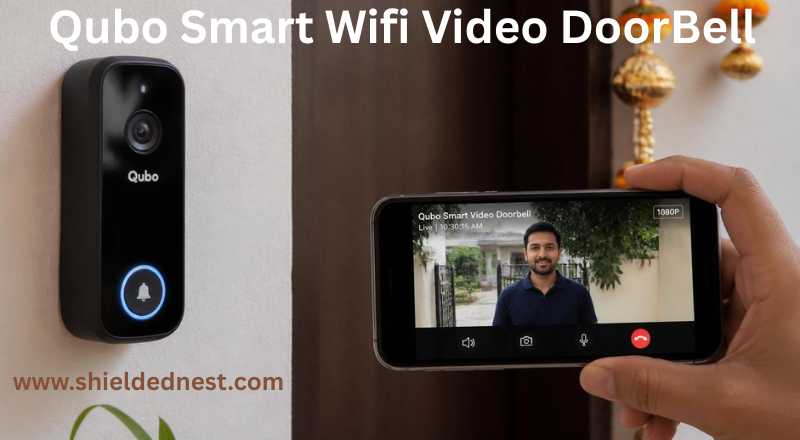
The Hero Group's Qubo Smart WiFi Video Doorbell is a smart home security device that uses AI to secure your doorstep, watch your front door activities, and communicate with guests from a distance.
They launched Qubo to bring affordable smart security products to Indian homes, and they have a growing lineup of smart cameras, video doorbells, and sensors.
This specific model, the Qubo Smart WiFi Video Doorbell, is their entry-level doorbell. It replaces your existing wired doorbell and connects to your home WiFi and allows you to see, hear, and talk to anyone at your door from your phone from anywhere in the globe.
It also integrates well with Alexa and Google Assistant; it has a built-in intruder alarm, and comes with an AC-powered plug-and-play provision.
Specifications
What is inside Box
The package box includes the doorbell unit, the AC chime, mounting screws, wall anchors, a wedge mount, and a wiring guide. Everything you need for installation is in the box and there is no need to buy anything from outside.
The doorbell itself feels good and slip, so it does not look bulky on your wall. The button is a proper physical press, not a touch-sensitive type, that makes you feel more reliable and natural.
The AC chime is a small white unit that simply plugs into any socket inside your home. That is it. No wiring, no batteries required it is just plug and play type,My first impression is, it is clearly designed for Indian homes.
Installation
Before going for the installation process, just ask yourself, Can You Do It Yourself?
Yes, most people can install this without calling for assistance.
If you already have a wired doorbell at your door, the Qubo simply replaces it. You disconnect the old doorbell, connect the two wires to the Qubo unit, and mount it well on the wall using the screws provided in the installation kit. If your wall is not perfectly flat, then make use of the wedge mount.
Then you download the Qubo app (available for Android and iOS), scan a QR code on the device, enter your WiFi password, and start setup it will take hardly ten minutes for completion.
Important for Indian buyers: This doorbell works only on 2.4 GHz WiFi. If your router shows multiple networks with different frequencies, make sure you connect the doorbell exactly to the 2.4GHz network. Many people miss this and blame the device is faulty.
When you are in a large villa or independent house, your gate must be far from your front door. In that case Qubo recommend you call their customer service first to check installation feasibility in this scenario. They will guide you further. This model works best for apartments and builder floors.
Camera and Video Quality
The 1080P camera produces sharp, clear video during daytime. You can read a package label clearly, see a visitor's face, and recognize the person standing at the door.
The complete entrance area is clearly seen because of the wide-angle lens provision. This coverage is sufficient in the hallway or doorway of a normal Indian flat.
Because night vision uses infrared LEDs, it goes into black-and-white mode as it becomes dark. It functions effectively in hallways with some natural light. However, if your entrance is completely dark, the night vision is average. A small porch light placed close to the door will have a major effect.
When someone presses the doorbell button, you get a video call notification on your smartphone within 1.5 to 2 seconds on a local home WiFi connection. If you are accessing the live feed over 4G mobile data, expect a slightly longer waiting time of around 4 to 5 seconds. Not very important, but worth knowing.
You can also set motion zones inside the Qubo mobile app, means the camera only sends alerts for movement in specific areas, like your doorstep, passage, etc. Otherwise, you would get a signal all the time for all unwanted movements. This is very useful for reducing unnecessary notifications.
Intruder Alarm — A Feature That Matters in India
This is one of the Qubo doorbell's best features, and it's particularly helpful in the Indian environment.
You won't receive warnings every time a leaf falls or a shadow moves because the integrated AI person detection can tell the difference between a person and a general movement. You start getting notifications on your phone whenever someone is detected on the camera.
If you suspect something suspicious, you can trigger a siren remotely through the mobile app, right from your phone, even if you are not at home. This can be enough to scare off an intruder or alert neighbors to come for help.
There is also a Do Not Disturb mode for late nights or during important calls. By using a pre-recorded message feature, you can set up responses like "Please leave the parcel at the door" or "I will be there in 5 minutes" for when you are busy and cannot answer live.
This visitor log and alarm system is really helpful for Indian families who want to keep an eye on delivery boys or domestic help arrival times.
What Happens During a Power Cut?
This is a question most international reviews never ask, but it is completely relevant in India.
The good news is that if your present doorbell wiring has a separate power source, as is usually the case in Indian apartments, the AC chime will continue to sound even in the case of a power outage. So you will not miss a guest.
The bad news is that you will not be able to access apps, live video, or notifications until the power is restored and the router reconnects if your WiFi router goes down during a power outage, which happens frequently.
Useful advice: Attach a tiny UPS (Uninterruptible Power Supply) to your WiFi router. During a power outage, a cheap UPS that costs between ₹1,500 and ₹2,500 will keep your router operational for one to two hours while maintaining full Qubo doorbell functionality. This action will save a lot of frustration in the future.
App and Smart Home Experience
The Qubo app is clean and easy to use. It gives you a live view, a visitor log showing who rang and when, motion alert history, storage settings, and device management, mainly all in one place.
You can add two devices to a single Qubo account, so both you and your spouse can receive visitor notifications and answer the door from your own phones without sharing the login credentials.
The interaction between Google Home and Alexa is more effective. Saying "Alexa, show my front door" will provide a live feed on an Echo Show. Alexa or Google Home will make an announcement when someone rings the doorbell; however, there is a 5-second lag compared to the direct phone notification. It's worth understanding, but it's not a major issue.
The fact that all of your video data is stored on Indian servers gives you a real privacy advantage over many foreign companies whose data is stored on overseas servers.
Comparison Table - Qubo Vs Others
Bottom line: If you want the best video quality, go with TP-Link Tapo. If you have elderly family members who prefer a dedicated screen, Godrej SeeThru makes more sense.
But for price, Made in India credentials, privacy, and ease of use in Indian apartments, Qubo is the ultimate choice.
Who Should Buy the Qubo Smart WiFi Video Doorbell?
Pros
What I liked:
• Made in India with data on Indian servers
• No batteries—AC powered and reliable
• Easy DIY installation for apartment owners
• AI person detection + remote siren = solid intruder alarm
• Alexa and Google Assistant support
• Multi-user access — two phones, one account
• Free professional installation in 70+ Indian cities
Cons
What could be better:
• 1080P only but no 2K option in this model
• 2.4GHz WiFi only, no 5GHz support
• Night vision is average in completely dark corridors
• App latency slightly higher on 4G connections
• Not perfect for large independent houses with distant main gates
Final Verdict
The Qubo Smart WiFi Video Doorbell is a solid, practical choice for Indian apartment owners and builder floor residents. It acts as it promises, you can see who is at your door, talk to them, and get alerted if something suspicious happens, notably all from your smart phone, particularly from any part of the world.
It is not the flashiest doorbell on the market. The 1080P resolution and black-and-white night vision are average by 2026 standards. But at ₹5,999, with a Made in India tag, Indian server data storage, an AC-powered chime which needs no batteries, and free installation support in 70+ cities, it really offers value for Indian homes.
Frequently Asked Questions (FAQ)
Disclosure: This article contains affiliate links. If you purchase through these links, ShieldedNest may earn a small commission at no extra cost to you. This helps us keep the blog running and publish honest reviews.
Check the latest price details of Qubo Smart Wifi video doorbell in Amazon